
Deploying Microsoft RD Web Access Infrastructure: A Cost-Effective Alternative to Azure Virtual Desktop
Shubh Techies
5/7/20262 min read
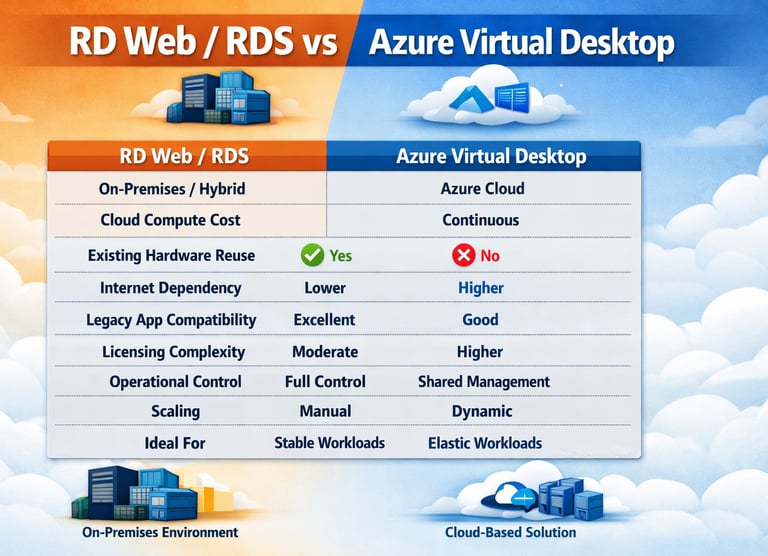
Organizations are increasingly looking for secure remote access solutions without significantly increasing cloud operational costs. While Azure Virtual Desktop (AVD) offers scalability and cloud-native management, many businesses still require a more controlled and cost-efficient approach for delivering remote applications and desktops.
Microsoft Remote Desktop Services (RDS) with RD Web Access continues to be a strong alternative for organizations that already maintain on-premises or hybrid infrastructure.
In this article, I’ll walk through deploying a complete RD Web Access infrastructure, while also highlighting where organizations can reduce operational costs compared to Azure Virtual Desktop deployments.
Why Organizations Still Choose RD Web Access
Remote Desktop Web Access (RD Web) allows users to securely access:
RemoteApps
Session-based desktops
Internal applications
Shared environments
through a browser-based portal.
For many organizations, RDS provides:
Lower recurring costs
Greater infrastructure control
Reuse of existing Windows Server licensing
Easier integration with legacy applications
Reduced dependency on cloud compute consumption
Where Cost Savings Come From
Many organizations migrate to AVD expecting lower costs but discover several recurring expenses:
Azure VM runtime costs
Storage consumption
Premium SSD pricing
Backup costs
Networking and bandwidth charges
Azure Firewall / Bastion costs
Log Analytics ingestion
Azure Virtual Network infrastructure
Reserved instance planning
With RD Web infrastructure, organizations can often:
Reuse Existing Infrastructure
Existing:
VMware
Hyper-V
Physical servers
SAN storage
can continue to operate without major redesign.
Reduce Monthly Operational Expenses
Unlike cloud desktops that run continuously or require scaling logic, on-prem RDS environments typically incur:
Fixed infrastructure cost
No cloud compute billing
Predictable budgeting
This becomes especially valuable for:
Small to mid-sized businesses
Manufacturing environments
Healthcare organizations
Internal line-of-business applications
Extend Legacy Application Lifecycles
Older applications that may not function properly in Azure Virtual Desktop environments can remain operational without requiring:
Application modernization
Packaging redesign
FSLogix optimization
Azure networking redesign
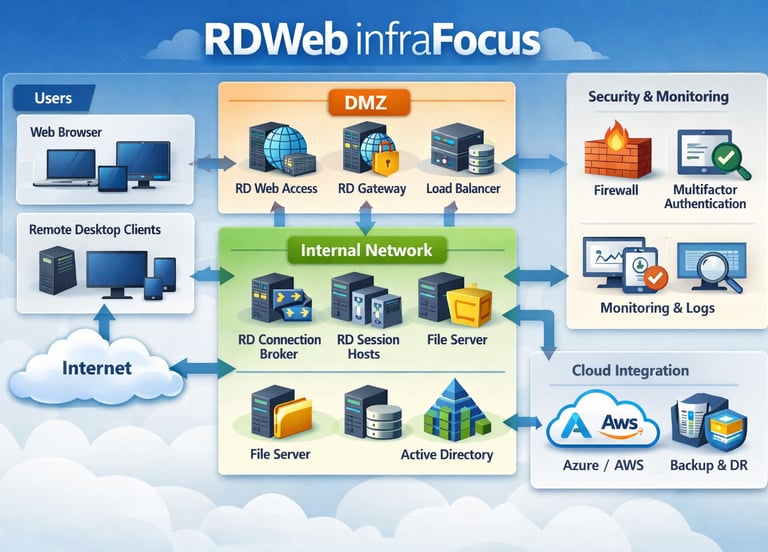
Step 1: Prepare the infrastructure by deploying Windows Server 2019/2022 systems, joining them to Active Directory, configuring DNS records, and obtaining public SSL certificates for RD Web and RD Gateway.
Step 2: Install Remote Desktop Services roles including RD Web Access, RD Gateway, RD Session Host, RD Connection Broker, and RD Licensing using Server Manager with a Standard Deployment configuration.
Step 3: Configure RDS Licensing by activating the RD Licensing server, installing RDS CALs, and assigning the appropriate licensing mode (Per User or Per Device).
Step 4: Configure RD Web Access and validate secure HTTPS connectivity to the RD Web portal while ensuring authentication and published resources are functioning correctly.
Step 5: Configure RD Gateway with CAP and RAP policies to securely allow remote access over HTTPS without exposing RDP directly to the internet.
Step 6: Assign SSL certificates to all RDS services including RD Web, RD Gateway, RD Publishing, and RD Broker to provide encrypted and trusted connectivity.
Step 7: Publish RemoteApps and session desktops through RDS Collections to centrally deliver business applications and internal tools to end users.
Step 8: Implement security hardening and monitoring by enabling MFA, enforcing TLS 1.2, restricting administrative access, monitoring login activity, and regularly patching RDS infrastructure components.
Compared to Azure Virtual Desktop, this approach can significantly reduce recurring cloud compute and storage costs by leveraging existing on-premises infrastructure, virtualization platforms, and Windows Server licensing investments.